Theme
Upgrading from v4 or v5 to v8
Upgrading from an old, discontinued and unsupported Syncplify.me Server! v4 or v5 to Syncplify Server! v8 requires careful planning. This page helps the system administrator keep the task as simple as possible.
WARNING
Versions 4 and 5 are retired. See the version schedule for the status of every major version.
Step 1: make sure you run the last release of your line
The last releases are 4.2.5 for v4 and 5.1.30 for v5. If you run an older build of your line, update to that release first; see Downloading older installers.
Step 2: take a backup of your old v4 or v5
In v4 and v5 a backup can only be taken locally, on the same machine or VM where Syncplify.me Server! is installed, by pasting a special URL into a browser (any browser except Internet Explorer). The function exists from version 4.2.5 onward; older v4 builds must be updated first (step 1).
Provided you use the standard port the software came preconfigured with, this is the URL for v4:
text
https://127.0.0.1:4443/dobk?dest=C:\SMSBackup&file=BK$datetimeAnd this is the one for v5:
text
https://127.0.0.1:5443/dobk?dest=C:\SMSBackup&file=BK$datetimeIf your web and REST interfaces run on ports other than 4443 (v4) or 5443 (v5), edit the URL with the port you use. Once you paste the URL into a browser on the server, a small OK message appears, and a ZIP archive with the full backup of your Syncplify.me Server! is in C:\SMSBackup.
Before you continue: what changes
With the backup file at hand, read these short observations and recommendations; they will save you a lot of headaches later:
- Windows users and groups have been dropped. This is not a Windows only software any more: since version 6, Syncplify Server! is cross platform (Windows and Linux), so every dependency tied to a specific operating system had to go. Active Directory users and groups are still supported, and are imported as LDAP users and groups.
- LDAP settings are stricter. All security aspects of the LDAP connections have been improved, which may require some reconfiguration; check the LDAP section of the manual.
- Your scripts, if any, are lost. After eight years of honorable service we said goodbye to the old scripting engine. All of our products now use SyncJS (the same language as Syncplify AFT!) as their only built in scripting language.
- Old or insecure host keys are not imported. The restore checks every host key in the backup; an insecure one is not imported, and a new host key is generated in its place.
- The ssh-rsa public key algorithm may be disabled after the upgrade. There are many good reasons to abandon RSA entirely (Ed25519 is the recommended key type); if your setup or your clients still need it, Unsupported public key algorithm ssh-rsa explains how to enable it, at your own risk.
- Encrypted VFSs, if any, cannot be imported, and as a consequence the users who use them are not imported either. There is a way to decrypt the contents of your old v4 or v5 encrypted VFSs, but you still have to recreate those VFS profiles and user accounts by hand in v8. This was sadly necessary, because the AES mode used by the old v4 and v5 encrypted VFSs is no longer considered secure by the researchers at NIST.
- Passwords containing certain special characters do not work after the import into v8. The problem is not v8, but an encoding bug in the old v4 and v5, which was self consistent there. Most passwords work fine after the upgrade; only those containing a tiny subset of special characters do not, and setting them again in v8, special characters included, fixes them for good. v8 has no problem with any special character; the problem was the old version.
- User account limits may have changed. The BASIC edition supports up to 100 user accounts per virtual site, while the PROFESSIONAL and ULTIMATE editions support an unlimited number; assess whether you need a higher edition.
- Other minor changes here and there. For example, certificates must be imported in their PEM encoded, cross platform format, and old or insecure encryption and key exchange algorithms have been dropped. After the upgrade, review the whole configuration to make sure it is still consistent.
INFO
Clients complaining about an "insecure data connection" or a missing "TLS session resumption" on FTPS are a symptom of a version older than 5.1.17; this upgrade is the fix.
The recommended way: a migration upgrade
For all the reasons above, we do not recommend in place upgrades. What we recommend instead is a migration upgrade, which is as simple as:
- installing Syncplify Server! v8 on a new machine or VM, preferably with a fresh operating system (Windows, Linux)
- importing your old v4 or v5 backup, in one click, from the Backup & Restore page of the SuperAdmin UI (leave the passphrase field empty, the old backups have none)
Important note for v4 and v5 license holders
Every new major version uses a new license code type, so a v4 or v5 license does not work with v8. If you have an active maintenance and support plan, request a free v8 license code with a support request from the Syncplify Customer Center, as explained in How to get support from Syncplify. If the plan has lapsed, it cannot be reinstated or extended for a v4 or v5 license, and you need to buy a new v8 license; for a quote, write to sales@syncplify.com.
If you still want an in place upgrade
In place upgrades are possible, though not recommended. The key points:
- First and foremost, before you start, take a full snapshot or backup of the machine or VM. It is the best way to roll back to your working v4 or v5 should anything happen.
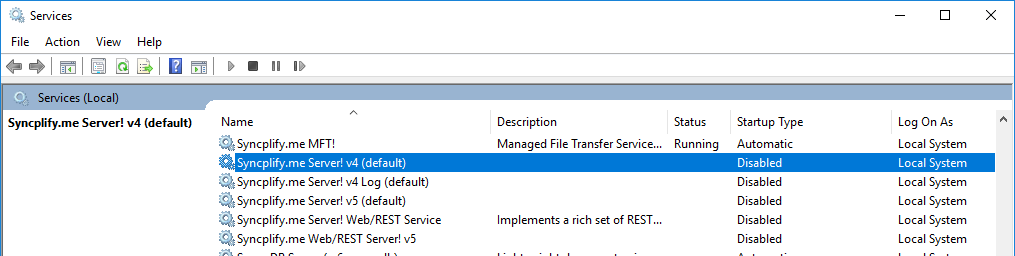
- The migration upgrade procedure above remains valid, with one addition: after taking the old v4 or v5 backup and before starting the v8 installation, stop and disable all the system services of the old version, as shown in this picture:
Final steps
As with every major version upgrade, upgrading to v8 is an opportunity to review your whole configuration and enhance your security posture. If the version you upgraded from used algorithms that are now considered weak, note that v8 may still support some of them for backward compatibility with legacy systems. After the upgrade, disable those weaker algorithms by hand for optimal security.