Theme
Using network shares (UNC paths) on Windows
Windows does not allow a system service running as SYSTEM (LocalSystem) to access UNC paths. This is a design choice by Microsoft, so every system service of every vendor, not just Syncplify, is subject to it.
So what can you do when your virtual site needs to reach a network share? For example, you may want to place your users' home VFSs on a different storage system, which is practically mandatory in a high availability deployment. The correct and secure way, according to Microsoft's own best practices, is the following.
Step 1: create a Windows or Active Directory service account
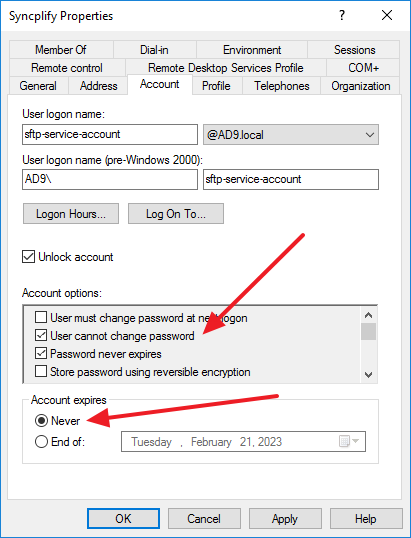
A service account is just a user account that will be used to run the virtual site's worker service. Set it to never expire and to never have to change its own password, so that unattended operation is not interrupted; an administrator rotates it from time to time according to corporate policy.
Step 2: grant the account the permissions it needs
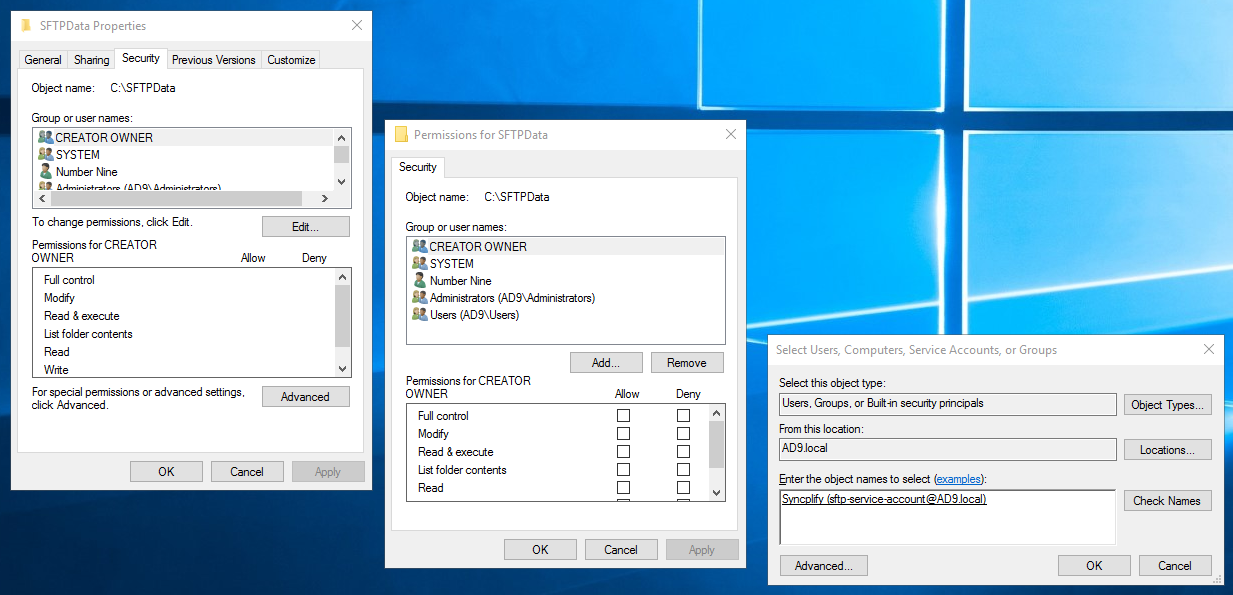
The service account needs read and write access to:
- the data directory,
C:\ProgramData\Syncplify\Serverand all of its subfolders (on v6 it isC:\ProgramData\Syncplify\ServerV6). Be aware thatProgramDatais hidden by default in Windows Explorer, but it is there; - every directory, folder and UNC path your VFSs point to.
It also needs the right to log on as a service, which Windows grants automatically when you assign the account in the next step.
Step 3: run the worker service under the service account
Open the Windows Services console (services.msc) and locate the worker service of the virtual site that needs to reach the network share. The service is named ss-wrk-<site> and displayed as Syncplify Server! Worker Service (<site>), where <site> is the virtual site's ID.
Double click it, open the Log On tab, choose This account and enter the service account and its password.
TIP
Restart the worker service for the change to take effect. Once restarted, the virtual site can access the home VFSs located on the UNC paths the service account has access to.
What about the connection between the two services?
The Web/REST service and each worker talk to each other over a named pipe that Windows itself guards. On v8 the pipe admits the worker by its service identity (NT SERVICE\ss-wrk-<site>), which Windows places in the service's token whatever account it logs on as, so changing the Log On As account does not break the dashboard, the session list or the Shield. The installer sets this up on every new installation and every upgrade. If you are unsure, check from an elevated prompt:
powershell
sc qsidtype ss-wrk-<site>It must report SERVICE_SID_TYPE: UNRESTRICTED. The manual explains the mechanism, the check and the fix in Running the services under dedicated accounts.