Theme
Encrypting a virtual file system at rest
You may have noticed that, depending on the edition of Syncplify Server! you run, you can enable Encrypt at rest when you create a new virtual file system (VFS). It means that whatever is uploaded to that VFS is stored in encrypted form on the server's storage, and decrypted transparently when a legitimate user downloads it again.
INFO
This has nothing to do with encryption over the network, which is always on and guaranteed by the file transfer protocols themselves. This article is about what the industry calls at rest encryption: the protection of the files where they are stored.
An encrypted VFS encrypts and decrypts on the fly while it interacts with the storage, so that the files at rest are always ciphertext. This is what lets you run your server externally, or delegate its operation to a third party, and still be sure that whoever operates the machine, or has raw access to the storage or the backups, cannot read your files. It is also a requirement in some cases under PCI DSS and HIPAA.
As long as an encrypted VFS is accessed through a file transfer client with a legitimate user account, it looks like any other folder, and its files download in clear.
Take a text file on your client computer, and upload it to an encrypted VFS on a remote Syncplify Server!. On the client it looks like this:
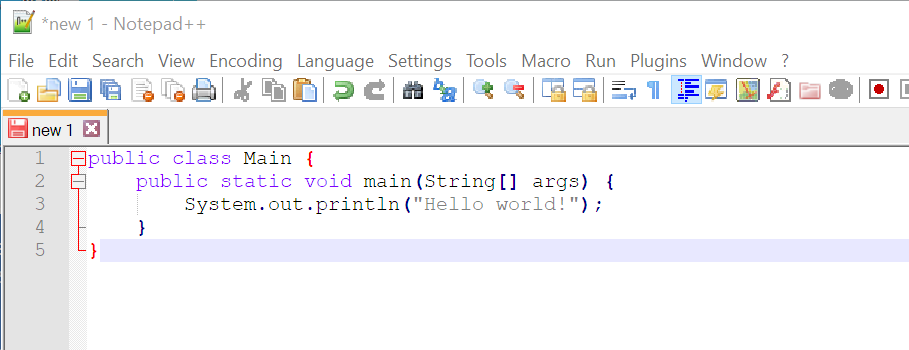
Yet, once uploaded, anyone with raw access to the server's storage sees only this:
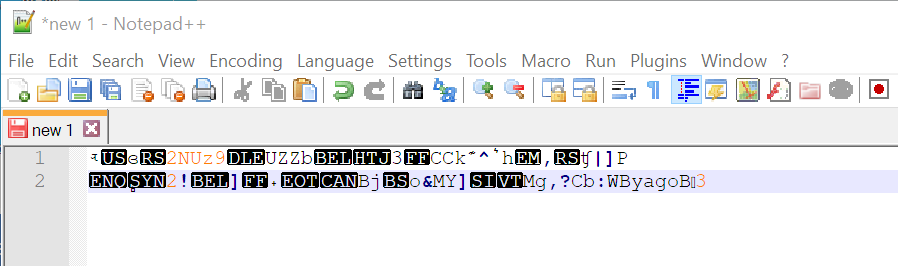
What you need to know before you enable it
- Edition. Encryption at rest is a feature of the Ultimate edition. On other editions the toggle is disabled and the editor says why.
- Decided at creation. Encryption is chosen when the VFS is created, together with its encryption passphrase, and it cannot be changed afterwards, in either direction. To encrypt data you already have, create a new encrypted VFS and move the files into it through a client. VFSs created by the user import command are never encrypted, so create those yourself first.
- The passphrase. It is stored, encrypted with the installation's own key, in the configuration database, and it travels with your database backups. Lose the configuration and its backups, and the files cannot be recovered.
- Backends. Disk, S3, Azure and GCP VFSs can be encrypted. An SFTP VFS cannot: the internal SFTP server owns that storage.
- No resume on an encrypted Disk VFS. An encrypted Disk VFS does not support appending to an existing file, so an interrupted upload cannot be resumed from where it stopped; the client uploads the file again from the start.
How the encryption works
The details differ by backend, but in every case the key is derived from your passphrase and never stored with the data:
- Disk. The server encrypts every file itself, with authenticated encryption (AES-256-GCM, or ChaCha20-Poly1305 on a CPU without hardware AES). Each file gets its own key, derived from the passphrase and a random per file nonce with HKDF-SHA256, so two identical files never produce the same ciphertext.
- S3, Azure and GCP. The provider does the encrypting, with a key the server supplies on every request and the provider does not keep: server side encryption with customer provided keys (SSE-C) on S3, customer provided keys (CPK) on Azure, customer supplied encryption keys (CSEK) on Google Cloud Storage. The 256 bit key is derived from your passphrase. Without it, the objects in the bucket or container cannot be read, not even from the provider's own console.
TIP
Feel free to run your SFTP server in the cloud, host it in any other place you do not fully control, or delegate its management to a third party: whoever has physical access to the storage still cannot read your files.
Encrypted VFSs created by v4 and v5 used a different scheme; if you still have one, see Recovering v4 and v5 encrypted VFSs. And if you are wondering whether PGP would do the same job: it would not, and the Miscellaneous chapter of this section explains why streaming encryption is the right tool for a file server.