Theme
Using another SFTP server as storage (SFTP VFS)
Syncplify Server!, through its virtual file system (VFS) storage layer, can store your server's data on various backends. This article covers the SFTP VFS type, which stores the data on another SFTP server behind yours.
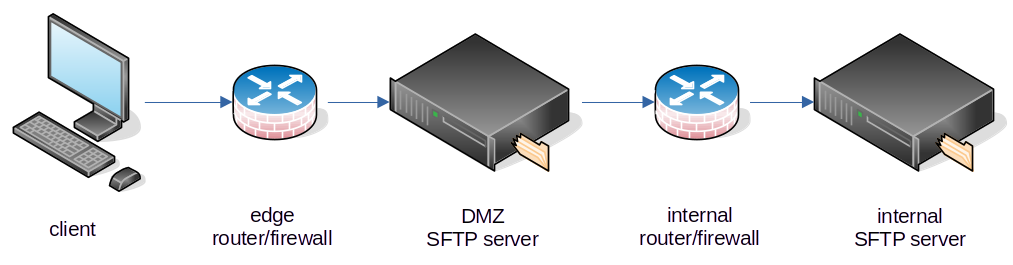
For all intents and purposes, this is an easy and powerful way to use your Syncplify Server! as an SFTP reverse proxy: clients connect to the server in the DMZ, and the files actually live on an internal server that is never exposed to the Internet.
INFO
The SFTP backend, like the other remote backends, requires the Professional or the Ultimate edition. It exists in v6 and v7 too, where the editor takes the connection as one sftp:// URL.
Creating the VFS
In the Admin UI of the virtual site, open Storage, then Virtual File Systems, select Create VFS, give it a name and choose the SFTP type. The editor then asks for:
- Connection: the Host and Port of the internal SFTP server, the Remote path to use as the starting directory (leave it blank for the server root), and the Username.
- Credentials: the Password, or a Private key in PEM format with its passphrase if it has one, or both when the internal server wants two methods.
- Host key fingerprint: optional, but recommended. Enter the SHA256 fingerprint of the internal server's host key, as in
SHA256:abc..., and the VFS refuses to talk to any other server that answers on that address. Left blank, the host key is not verified. - Max reconnect retries and Retry interval: how the VFS behaves when the internal server drops the connection.
Save it. You can now use this VFS as a user's home VFS, or as the target of a virtual folder. When a client connects to your Syncplify Server! in the DMZ and this VFS is selected, all data is transparently stored on the internal SFTP server, provided it is running and accepts connections from your DMZ server.
The manual documents every field in Virtual File Systems.