Theme
High availability (HA) concepts
INFO
This page describes the high availability design of Syncplify Server! v8. The setup page shows how to build the cluster, and Upgrading a v6 or v7 HA cluster to v8 covers the move from the previous design.
One of the most important qualities of Syncplify Server! is the simplicity with which you can create a true active active high availability (HA) set with it.
Up to and including version 5, high availability required a database replica set, which is hard to deploy and needs at least five virtual machines (two SFTP nodes and three database nodes). From version 6 on, and with the subsystem redesigned in v8, there is no external database at all: each node runs its own local database instance, and the synchronization between nodes is handled by the server itself, not by the database. Every node is therefore self contained, and Syncplify Server! achieves a fully fault tolerant, active active, highly available deployment with as few as two nodes.
To operate correctly, all nodes in the cluster must have their system clocks synchronized with a reliable time source. Enabling NTP on all nodes is the recommended way to meet this requirement consistently; a node whose clock drifts too far is refused when it joins.
Of course, Syncplify is in the secure file transfer business, not in the networking or storage business, so you provide the networking and storage components yourself. This is equally true of any other SFTP server on the market.
So, without further ado, let's dig in.
With a load balancer
If you have a load balancer, we definitely recommend that you use it. Your deployment then looks somewhat like this:
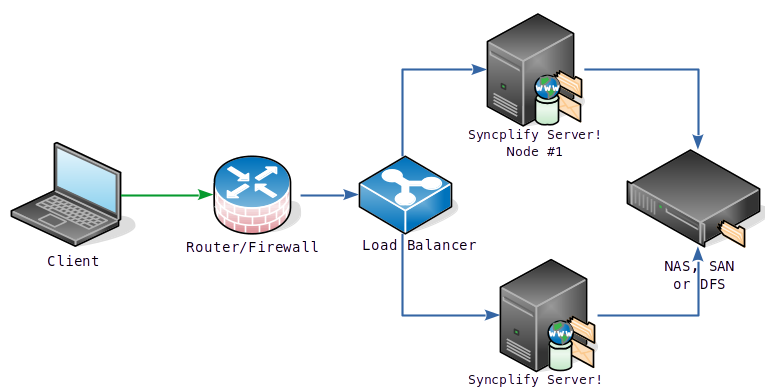
Load balancers probe the nodes continuously, and the server's automatic protection can mistake that for an attack: the setup page explains why the load balancer's address belongs on the safe list of every virtual site.
Without a load balancer
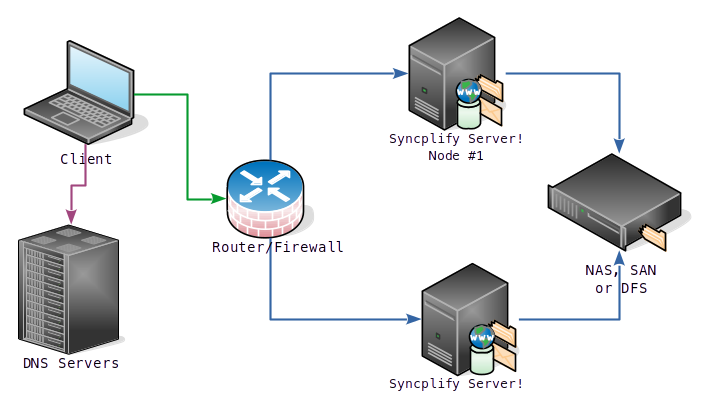
If you do not have a load balancer, you can still achieve a remarkable level of high availability by creating multiple A records in your DNS for the host name of your FTP or SFTP server, and configuring the DNS to answer in round robin. Unlike a load balancer, the DNS cannot probe your SFTP nodes to see whether they are alive, but it directs the client connections equally to both nodes, spreading the incoming traffic just like a load balanced HA set would.
INFO
In both cases shown above, it is your responsibility to provide shared storage to all SFTP nodes. The diagrams show a Windows DFS, a NAS or a SAN of your choice; any network file system that the nodes can access natively works too (an iSCSI target, for example, is perfectly fine).