Theme
Triggering jobs from the command line
Syncplify AFT! provides two commands for running scripts from a shell or a CI/CD pipeline.
| Command | What it does |
|---|---|
aft start | Calls the REST API of a running AFT! instance and queues the job there. The script runs inside the service, with full access to the VFS library and the secrets. The command returns immediately; the job runs in the background. |
aft run | Executes a script in the calling shell process. No API key is needed. The script runs to completion before the command returns, with an exit code. |
If the tool you are automating from cannot run the aft binary at all, call the REST API directly instead: see Triggering a job through the REST API.
aft start: trigger a stored script through the API
Prerequisites
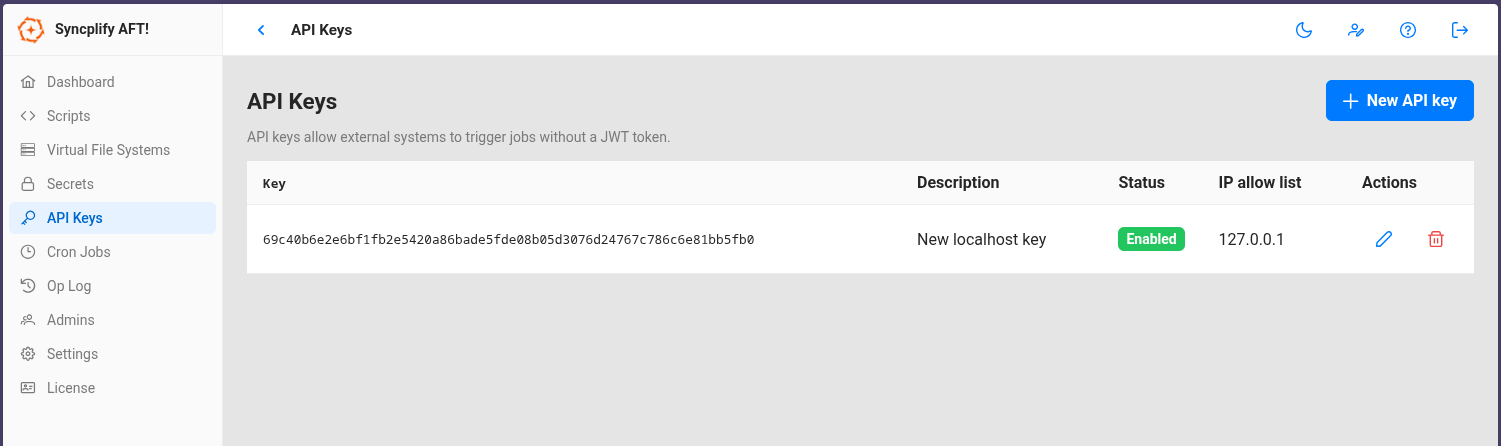
- An API key. Create it in the AFT! web UI on the API keys page. Give the key an IP allow list (comma separated addresses or CIDR ranges) that includes the machine you will be calling from; for calls from the same machine,
127.0.0.1is enough. An empty allow list accepts any address, which is rarely what you want. - TLS enabled on the instance.
aft startalways connects over HTTPS, so the instance needs a certificate (Settings page, TLS section, where you can import one or generate a self signed certificate). With a self signed certificate, add--insecureto the command.
Minimal example
Linux and macOS:
bash
./aft start -n "My Backup Job" -a "your-api-key" --insecureWindows (PowerShell):
powershell
.\aft.exe start -n "My Backup Job" -a "your-api-key" --insecureScript names are matched case insensitively. On success the command prints the job information returned by the API and exits with code 0; on any other response it prints the error and exits with code 1.
With parameters and a remote instance
Linux and macOS:
bash
aft start \
  -n "My Backup Job" \
  -a "your-api-key" \
  --params '{"character":"goofy"}' \
  --host "192.168.1.10:44399"
Windows (PowerShell):
powershell
.\aft.exe start `
  -n "My Backup Job" `
  -a "your-api-key" `
  --params '{"character":"goofy"}' `
  --host "192.168.1.10:44399"
Inside the script, read the parameter with Param("character"). Parameters are a flat JSON object whose values are strings.
Flags
| Flag | Meaning |
|---|---|
-n, --scriptname | Name of the stored script to run. |
-s, --scriptid | ID of the stored script. Kept for compatibility with v3 integrations; prefer the name. |
-a, --apikey | The API key (required). |
--host | Host and port of the AFT! instance. Defaults to 127.0.0.1:44399. |
--params | Named parameters as a flat JSON object, for example '{"key":"value"}'. |
--insecure | Skip TLS certificate verification, for self signed certificates. |
aft run: execute a script directly
The Allow CLI run option must be enabled on the Settings page of the web UI. It is disabled by default, because with it anyone who has shell access to the machine can execute scripts without going through the API authentication; an administrator enables it deliberately.
Minimal example
Linux and macOS:
bash
./aft run -f "/opt/scripts/my-transfer.syncjs"Windows (PowerShell):
powershell
.\aft.exe run -f "C:\Scripts\my-transfer.syncjs"With parameters
Linux and macOS:
bash
./aft run -f "/opt/scripts/my-transfer.syncjs" -p '{"destination":"/archive/2026"}'Windows (PowerShell), where the backslashes of a Windows path must be doubled inside JSON:
powershell
.\aft.exe run -f "C:\Scripts\my-transfer.syncjs" -p '{"destination":"D:\\Archive\\2026"}'Flags
| Flag | Meaning |
|---|---|
-f, --file | Path to a .syncjs script file. |
-n, --scriptname | Name of a stored script, as an alternative to a file. |
-s, --scriptid | ID of a stored script, kept for compatibility. |
-p, --params | Named parameters as a flat JSON object. |
Notes
aft runis synchronous: the command blocks until the script finishes, then exits with code 0 on success, or code 1 if the script failed or crashed.- If the AFT! service is running on the same machine,
aft runhands the script to the service, so that it runs with full access to the VFS library and the secrets. Run the command as the same user the service runs as, otherwise the hand off is refused. If the service is not running,aft runopens the local database directly. - The definitive exit code makes
aft runa natural fit for operating system cron jobs, CI/CD pipelines and shell scripts.