**IMPORTANT**: this feature requires Syncplify Server! **version 6.2.50 or greater**. It was not present in versions prior to 6.2.50 so if you attempt to use this feature in older versions it won't work.
Sometimes, to ease transition from other SFTP servers, it may be useful to have the ability to import user profiles, along with their home VFSs, in bulk from a comma-separated value (CSV) file. The `importusers` command does exactly that. Let's see its inline help first, to familiarize ourselves with how it works: [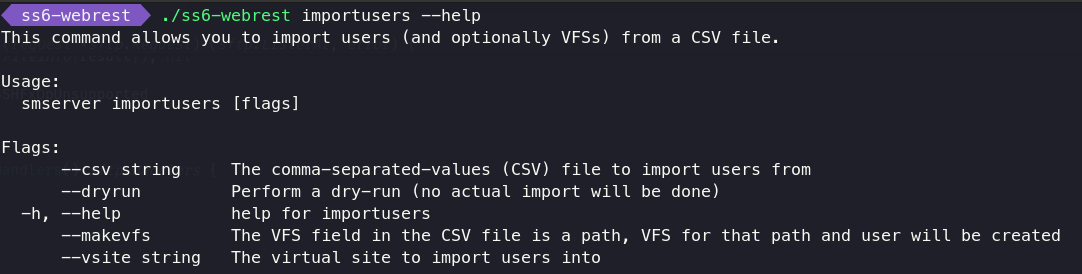](https://kb.syncplify.com/uploads/images/gallery/2024-10/image.png) Things to notice: - It is a command built into the **ss6-webrest** executable - It can take various options at command-line: - **`--csv`** is **mandatory**, this is the path to the CSV file containing info on the user profiles to be imported - `--vsite` is also **mandatory**, it's the ID (not the friendly name) of the virtual site you wish to import users into - `--makevfs` is boolean and optional, if present the VFS field in the CSV file is expected to be an absolute directory path and a VFS for that path will be created and assigned to the user as its Home-VFS - `--dryrun` is boolean and optional, if present no changes will be made to your Syncplify Server! and the importusers command will only evaluate whether or not the import operation would be successful Now let's explore the format of the CSV data that is expected by the `importusers` command. It obviously depends on whether or not the `--makevfs` parameter is present. If the `--makevfs` parameter is present, the CSV must contain data like this: ```yaml oneuser,"some password","/home/oneuser","ssh2_scp,ssh2_sftp,ftps,ftpes,https,https_sharing","dirList" anotheruser,"some other password","/home/differenthome","ssh2_shell,ssh2_scp,ssh2_sftp","dirList,dirMake,dirRename,fileGet,filePut,fileModify,fileRename" third_user,"different password","/home/oneuser","https,https_sharing","dirList,dirMake,dirRename,dirDelete,dirEditMetadata,fileGet,filePut,fileModify,symlink,fileRename,fileDelete,fileEditMetadata" test,test123,"/home/oneuser","ssh2_sftp,ftps,ftpes,https,https_sharing","dirList,dirMake,filePut,fileModify" ``` Whereas if the `--makevfs` parameter is **not** present, the CSV must contain data like this: ```yaml oneuser,"some password",2iSpTdEgRGPuYh0MVx2uWr5zxR4,"ssh2_scp,ssh2_sftp,ftps,ftpes,https,https_sharing","dirList" anotheruser,"some other password",2l42WNHRjDtQUx8HdhGV5Jwq5j0,"ssh2_shell,ssh2_scp,ssh2_sftp","dirList,dirMake,dirRename,fileGet,filePut,fileModify,fileRename" third_user,"different password",2mDUX9qjygr3dOOzBx4S6kwLcah,"https,https_sharing","dirList,dirMake,dirRename,dirDelete,dirEditMetadata,fileGet,filePut,fileModify,symlink,fileRename,fileDelete,fileEditMetadata" test,test123,2mDUa8AaNKnmebSKy1ziUMyns0d,"ssh2_sftp,ftps,ftpes,https,https_sharing","dirList,dirMake,filePut,fileModify" ``` As you can see the only difference is that when `--makevfs` is present the 3rd field of each record in the CSV is expected to be a fully-qualified and absolute path to a local storage location available in your OS, whereas when `--makevfs` is absent the import process expects you to provide the ID of an existing VFS already configured in your Syncplify Server! All other typical CSV format requirements remain in place, like, for example, the need to double-quote strings that contain spaces, wherever they might be. So, what is the accepted content for each field in each record (line) of the CSV? Here you go: 1. **Username**: all lowercase and absolutely no spaces 2. **Password**: free text (within double-quotes only if it contains spaces) 3. **VFS ID** or **Absolute Path**: depending on the presence of `--makevfs` as explained above 4. **Allowed subsystems**: a double-quoted string containing a comma-delimited list of the following valid values: `ssh2_shell,ssh2_command,ssh2_scp,ssh2_sftp,ftp,ftps,ftpes,https,https_sharing` 5. **Permissions**: a double-quoted string containing a comma-delimited list of the following valid values: `dirList,dirMake,dirRename,dirDelete,dirEditMetadata,fileGet,filePut,fileModify,symlink,fileRename,fileDelete,fileEditMetadata` Here's the typical output of a dry run: [](https://kb.syncplify.com/uploads/images/gallery/2024-10/aLHimage.png) And here's the typical output of an actual import operation: [](https://kb.syncplify.com/uploads/images/gallery/2024-10/eZPimage.png) ##### Limitations The current version of the `importusers` command has several limitations and makes several assumptions, namely: - It can only import "Normal" users, which are users authenticated locally by Syncplify Server!, it cannot import "LDAP" users - It can only import users that use Password authentication (it can't import PKI auth configurations nor key-pairs) - It can associate users to any VFS type (Disk, S3, Azure, etc...) if the VFS ID is provided, but when using `--makevfs` it can only create Disk-type VFSs - It can only import the following 5 details for each user: username, password, VFS, subsystems, and permissions - It needs to be run as Administrator (in Windows) or as root/sudo in Linux